|
This tab displays general information about individual
clients.
|
|
|
|
Client Name
|
Name of Client (Can be changed in the Client's properties dialog
- tab General)
|
|
Computer Name
|
Name of workstation / server (hostname)
|
|
MAC Address
|
MAC address (network adapter)
|
|
Primary Server
|
Name of ERAS with which a client is communicating
|
|
Domain
|
Domain / group name, to which a client belongs (these are not
groups created in ERAS)
|
|
IP
|
IP address
|
|
Product Name
|
Name of ESET security product
|
|
Product Version
|
Version of ESET security product
|
|
Policy Name
|
Name of policy assigned to a client
|
|
Last Connected
|
Time that client last connected to ERAS (All other data
collected from clients includes this timestamp, except for some
data obtained by replication)
|
|
Protection Status Text
|
Current status of the ESET security product installed on
a client
|
|
Virus Signature DB
|
Version of virus signature database
|
|
Last Threat Alert
|
Last virus incident
|
|
Last Firewall Alert
|
Last event detected by the ESET Smart Security Personal firewall
(Events from the Warning level and higher are shown)
|
|
Last Event Warning
|
Last error message
|
|
Last Files Scanned
|
Number of scanned files during the last On-demand scan
|
|
Last Files Infected
|
Number of infected files during the last On-demand scan
|
|
Last Files Cleaned
|
Number of cleaned (or deleted) files during the last On-demand
scan
|
|
Last Scan Date
|
Time of last On-demand scan
|
|
Restart Request
|
Is a restart required (e.g., after a program
upgrade)
|
|
Restart Request Date
|
Time of first restart request
|
|
Product Last Started
|
Time that client program was last launched
|
|
Product Install Date
|
Date that the ESET security product was installed on the
client
|
|
Roaming User
|
Clients with this attribute will perform the update now task
each time they establish a connection with the ERAS (recommended
for notebooks). The update is only performed if the client's virus
signature database is not up to date.
|
|
New Client
|
Newly connected computer (see chapter General description of tabs and
clients)
|
|
OS Name
|
Name of client operating system
|
|
OS Platform
|
Operating system platform (Windows / Linux
)
|
|
HW Platform
|
32-bit / 64-bit
|
|
Configuration
|
Clients current.xml configuration (including date/time that the
configuration was created)
|
|
Protection Status
|
General status statement (Similar in nature to the Configuration
attribute)
|
|
Protection Features
|
General status statement for program components (Similar to
Configuration attribute)
|
|
System Information
|
Client submits system information to ERAS (including time that
the system information was submitted)
|
|
SysInspector
|
Clients with versions containing the ESET SysInspector tool can
submit logs from this complementary application.
|
|
Custom Info
|
Custom Information to be displayed specified by the
administrator (this option can be configured in ERAC through
Tools > Server Options
> Advanced
tab > Edit Advanced Settings
> ESET
Remote Administrator > ERA Server > Setup > Other settings
> Client custom info).
|
|
Comment
|
A short comment describing the client (entered by the
administrator)
|
NOTE: Some values are for
informational purposes only and may not be current when the
administrator views them at the Console. For example, at
7 a.m. there may have been an update error, but at 8 a.m.
it was performed successfully. These values may include
Last Threat Alert and
Last Event Warning. If the
administrator knows this information is obsolete, it can be cleared
by right-clicking and selecting Clear Info > Clear Last Threat Alert Info or
Clear Last Event Warning Info .
Information about the last virus incident or last system event will
be deleted.
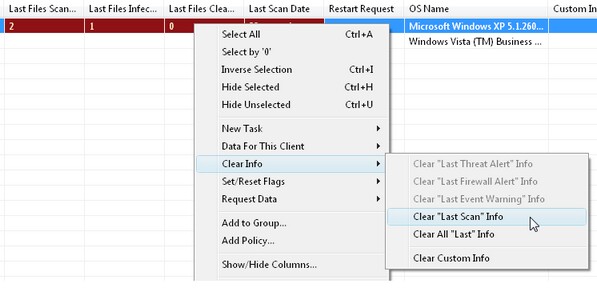
Fig.: Obsolete events from the Last
Threat Alert and Last Event Alert Warning columns can easily be
removed.
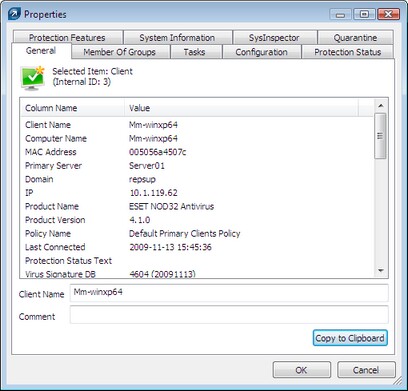
Fig.: Detailed information about a
client workstation.
The Clients tab offers several options
after double-clicking on a client:
Contains similar information to that displayed in the Clients
tab. Here you can specify the Client Name the name under which
this client is visible in ERA, plus an optional comment.
This tab lists all groups to which the client belongs. For more
information, see chapter Information filtering.
Tasks related to the given client. For more information see
chapter Tasks.
This tab allows you to view or export the current client
configuration to an.xml file. Later in this manual, we will explain
how .xml files can be used to create
a configuration template for new/modified.xml configuration files. For more
information see chapter Tasks.
This is a general status statement regarding all ESET programs.
Some of the statements are interactive and allow immediate
intervention. This functionality is useful in that it prevents the
need to manually define a new task to solve a given
protection problem.
Component status for all ESET security features (Antispam,
Personal firewall, etc.)
Detailed information about the installed program, its program
component version, etc.
Detailed information about startup processes and processes
running in the background.
Contains a list of quarantined files. Quarantined files can be
requested from a client and saved to a local disk.
|

